Accessing Report Cards

Logging Into The Parent Portal (Please read carefully)
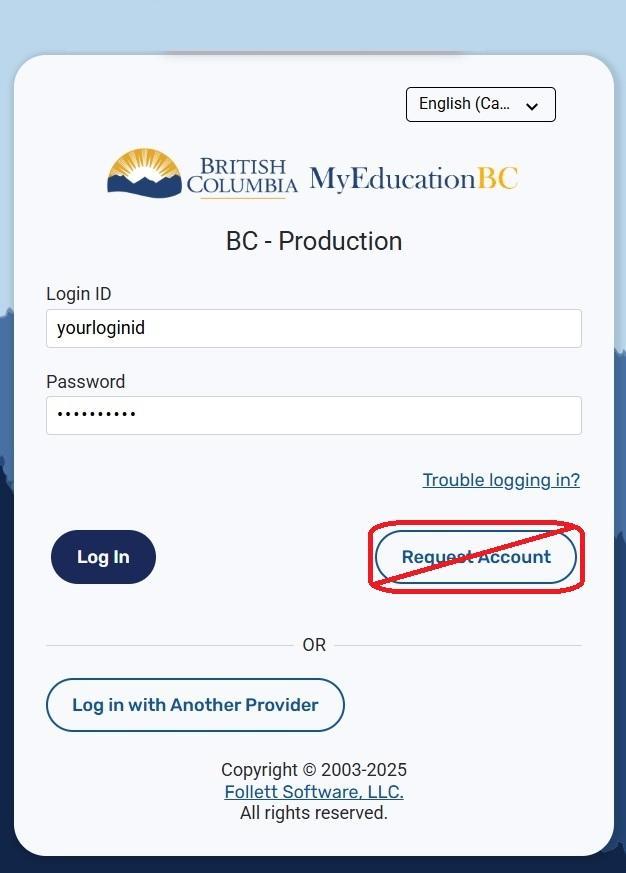
Always use this URL to find the MyEducation BC login page: https://www.myeducation.gov.bc.ca/aspen
Enter your MyEd Login ID and Password. If you are unsure of either, please select “Trouble Logging In” and follow the instructions.
Do not select “Request Account”. Parent accounts are set in district. If you aren’t sure you have an account (i.e.: you just moved to our district), then please send an email to [email protected]
If you previously requested to log in using your BC Services Card, you would “Log In With Another Provider”.
Viewing your Child’s Attendance and Achievement Information
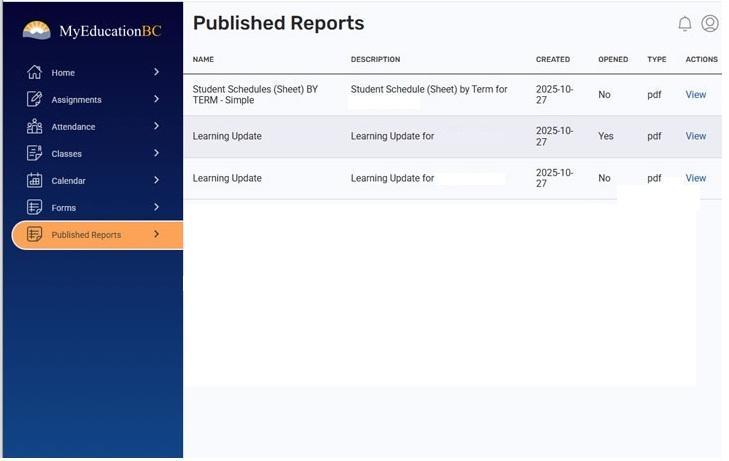
When you log in, you should see the following screen.
To view any published documents, including report cards, click on the Published Reports option.
Please note that, depending on publishing times, you may not see the Published Reports tab. If you do not see this tab, then it is likely that
a. the school has not published any documents for you to see, or
b. the time that was available for parents to view report cards has ended. If this is the case, you may need to contact the school to have them republish your child's report card so you can see it in MyEd.
A few of the menu items are dependent on whether the school uses these in MyEd. As a result, you may not see some of the menu items shown here.
If you are unable to access your child(ren)’s report card using MyEd, please email your school for a printed copy.
For additional information on the Family and Student Portal, please visit https://www.myeducationbc.info/
For assistance with your MyEd account, please contact: [email protected]